MyMercy
- 4.1
- Rating
- 500.00K
- Installs
- Free
- Price

 Analysis by App-foxy
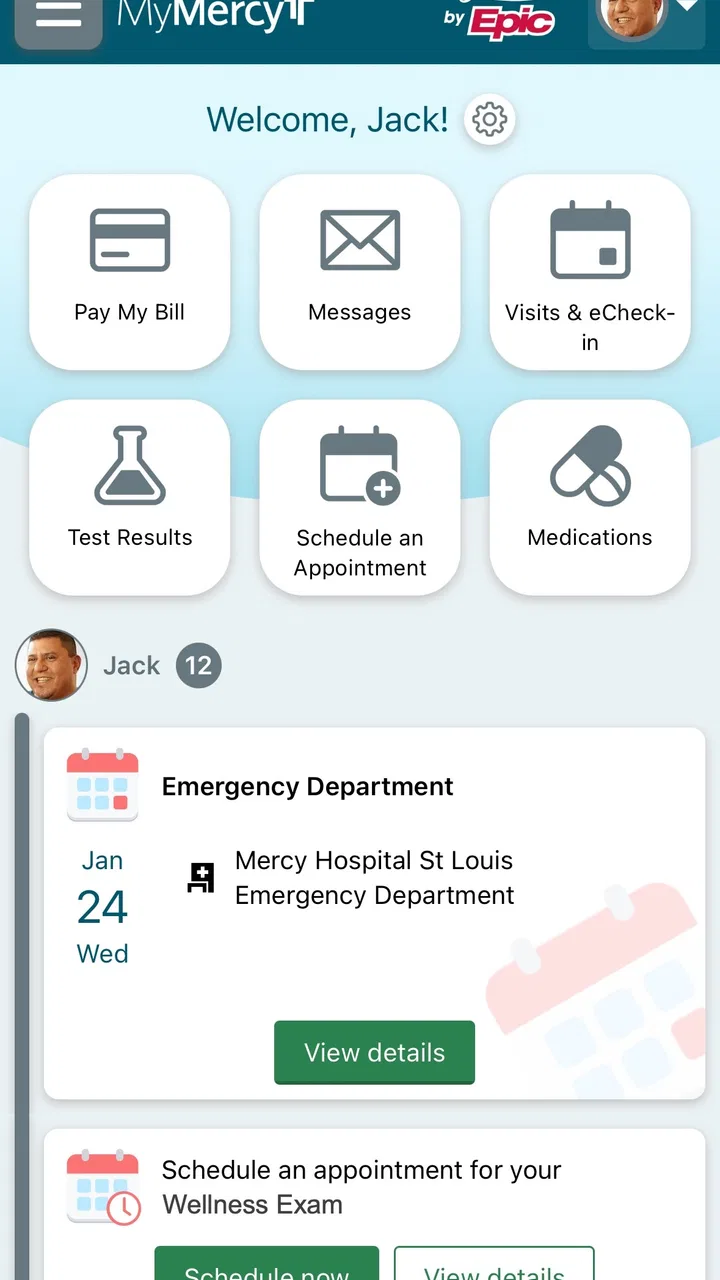
I came away from MyMercy with a fairly clear impression: it is most useful when you already receive care through Mercy and want a more convenient way to stay connected with that healthcare system. I would not treat it as a replacement for a doctor, an urgent-care service, or a dedicated health-tracking tool. Its value is more practical than exciting. It brings routine healthcare tasks into one place, which can save time when you need to manage appointments, communicate with care teams, or keep track of information that is otherwise scattered across calls, messages, and paperwork.
That focus makes sense for a medical app developed by Mercy. It is free, available to an Everyone-rated audience, and has built a substantial user base, with over 500 thousand installs. The overall rating sits at 3.5 from around 5 thousand ratings, while the app has received roughly 3 thousand written reviews. Those figures suggest a service that many people rely on, but also one where the experience can vary depending on the user’s healthcare relationship, device, and expectations.
What MyMercy is actually good at
The strongest reason to use this app is convenience. Healthcare administration is full of small tasks that become frustrating when handled separately: checking an upcoming visit, finding a message from a clinic, reviewing information connected with care, or preparing for a conversation with a provider. A patient portal app can make those tasks feel less like a series of interruptions and more like one organized routine.
You May Also Like

 Blood Strike: 2.5 Anniversary
Blood Strike’s Loadouts Turn Every Drop Into a Tactical Gamble
A close look at Blood Strike’s custom loadouts: how fast access to signature weapons reshapes its battle royale rhythm, rewards preparation, and narrows the gap between fights.

 Pandora - Music & Podcasts
Pandora’s Music Is Easy to Start, but Harder to Recover
Pandora’s strength is its low-effort path from a seed to a station. Its weak spot is how much confidence it asks you to place in connection, setup, and quiet recovery.

 8 Ball Pool
 Is Built on Rivalries, Rematches, and Routine
A close look at the rivalries, rematches, shared routines, and unanswered safety questions that turn a quick pool match into a persistent mobile community.

 Samsung Music
’s Quiet Strength Is Playing What You Already Own
Its reach comes less from spectacle than from dependable access to a personal library. That simplicity is both the app’s strongest retention engine and its ceiling.

 AccuWeather: Weather Radar
AccuWeather Review: A Quick, Clear Forecast for Everyday Decisions
For everyday plans, the best forecast is the one you can understand quickly. AccuWeather makes rain timing, radar, and local conditions easy to act on, with a few trade-offs.

 Hill Climb Racing
Why Hill Climb Racing Still Turns Crashes Into One More Run
A tiny car, a bumpy hill and one more upgrade: Hill Climb Racing keeps resurfacing because its simple chaos makes every near-miss feel personal.
More From Our News Desk



In my experience, the best way to approach MyMercy is not as something you open constantly, but as a central doorway for moments when you need to act. Before an appointment, I would use it to review the details already available to me and gather questions in advance. After a visit, it can be useful to return to the information later, when I am less distracted and can read it carefully. That simple change matters because medical conversations are often fast, and remembering every instruction afterward is not always realistic.
The app’s connection to Mercy is also its main advantage over a general-purpose health app. A fitness tracker may be better for exercise trends, sleep data, or long-term lifestyle goals, while a generic notes app may be better for writing down symptoms. MyMercy serves a different purpose: it is tied to the practical side of receiving care through Mercy. If your doctors and appointments are already within that system, the app has context that a standalone health organizer cannot easily provide.
That distinction is important for deciding whether it deserves space on your phone. Someone who rarely interacts with Mercy may find little reason to open it. Someone with recurring appointments, ongoing treatment, or several family healthcare tasks may appreciate having a single place to return to. The app becomes more valuable as the number of healthcare interactions increases, because the cost of searching through email, paper documents, and phone contacts increases with it.
A realistic appointment-day workflow
Imagine that I have an appointment later in the week and want to avoid arriving unprepared. Instead of relying on memory, I can use the app as a short preparation checkpoint. I would review the visit information available there, write down changes in symptoms or medication questions separately if needed, and make sure I know what I want to ask. Afterward, I would revisit the app when I have time to process the instructions rather than trying to reconstruct the conversation from memory.
This workflow is more useful than simply saying that a medical app is “convenient.” It gives the app a role before and after care. The pre-visit role is organization; the post-visit role is recall and follow-through. For a person managing regular care, that can reduce the mental load around appointments even when the app itself is not doing anything dramatic.
One practical tip is to treat the app as a reference point, not as your only memory system. I would still keep a short personal list of questions and symptoms, especially if the issue changes from day to day. The app can help me access care-related information, but it cannot know what I forgot to mention. That small distinction prevents a common mistake: assuming that having a portal means being fully prepared for a medical conversation.
Where the app fits in a wider health routine
MyMercy works best when paired with simple habits rather than used in isolation. I would use a notes app or paper notebook for observations between visits, a calendar for broader life scheduling, and this app for Mercy-related healthcare tasks. Trying to force one medical portal to perform every health-management function is likely to be disappointing.
This separation also helps with clarity. A symptom diary is personal and ongoing, while a care portal is connected to interactions with a healthcare provider. Keeping those roles distinct makes it easier to decide what I need to bring to an appointment and what I need to look up afterward. The app can support the conversation, but it should not replace the conversation.
Another useful habit is checking information when I am calm rather than waiting until I am rushing out the door. If I only open a healthcare app during a stressful moment, even a small login issue or unclear screen can feel much more serious. Using it occasionally for ordinary tasks helps me become familiar with its layout and reduces friction when an important appointment is approaching.
The meaningful limitation: usefulness depends on the Mercy connection
The biggest weakness is also the most obvious trade-off: MyMercy is not a universal medical organizer. Its usefulness depends on whether Mercy is the healthcare system involved in your care and whether the information you need is available through that relationship. If most of your doctors, clinics, and records are elsewhere, you may end up switching between several portals anyway.
That fragmentation is not unique to this app, but it affects the decision to install it. A person who wants one complete picture of every provider, prescription, test, and health measurement may prefer a broader personal health solution, depending on what their devices and healthcare providers support. MyMercy is more focused. That focus can make it easier to use for Mercy-related tasks, but it also means it may not become the single health dashboard some people expect.
I also would not install it with the expectation that every healthcare problem can be solved inside the app. A portal is not a substitute for urgent medical attention, and it is not the right place to wait when symptoms require immediate help. The sensible approach is to use it for routine communication and organization while following the appropriate emergency or urgent-care route when the situation calls for faster attention.
There is also a human limitation to consider. Digital convenience does not help everyone equally. People who are uncomfortable with smartphone navigation, who share devices, or who have difficulty keeping track of account credentials may find a traditional phone conversation easier. For them, the app can be an additional channel rather than a simplification. I would recommend trying it, but not assuming that digital access must replace every other way of contacting care.
What I would check before relying on it
Before making MyMercy part of my routine, I would confirm that my relevant care is connected to Mercy and that I can access the account comfortably on my phone. I would also look at whether the information I need appears in a form that is easy for me to understand. A medical app is only helpful if it reduces confusion rather than adding another place to search.
I would pay particular attention to notifications and messages. If the app sends alerts, I would make sure they are visible without becoming overwhelming. If I receive a message connected with care, I would read it carefully and save any instructions I need to discuss with a provider. I would not assume that an alert alone means an issue has been resolved.
Account security deserves ordinary caution as well. I would use a device lock, avoid leaving the account open on a shared phone, and take care when accessing personal health information in public. Those are not reasons to avoid the app; they are sensible habits for any tool that brings medical information onto a mobile device.
Who will get the most from it
I think MyMercy is a strong fit for Mercy patients who want less friction around routine care. It is especially sensible for people with recurring appointments, caregivers helping a family member organize healthcare, and patients who prefer reviewing information on a phone instead of making a call for every small question. The benefit grows when healthcare administration is already taking up too much attention.
It may also suit people who like to prepare. I prefer having a few minutes to review an appointment and collect my questions before speaking with a clinician. The app supports that kind of deliberate workflow better than relying on memory or searching through old messages. It can turn a visit from a vague obligation into something I approach with a clearer plan.
On the other hand, I would skip it if I do not use Mercy for care, if I only want a workout or nutrition tracker, or if I expect a complete cross-provider health record in one place. I would also hesitate to depend on it as my only communication method if I regularly struggle with mobile accounts. In those cases, a general health app, a calendar, a notebook, or direct contact with a clinic may be more suitable.
Version, availability, and everyday expectations
The current version is 11.4.3, and the app supports Android 9 or later. That makes the operating-system requirement worth checking before installation, particularly if you are using an older phone. The app is free, which removes the financial barrier to trying it, though the real value still depends on having a meaningful Mercy healthcare connection.
Its long availability also helps explain why it feels like a practical service rather than a novelty. MyMercy was released on November 12, 2015, so it has had time to become a familiar access point for patients. At the same time, a long-running app should still be judged by how smoothly it fits current habits. A medical portal can be important even when it is not visually memorable, but confusing navigation or inconsistent access would quickly undermine that purpose.
I would therefore judge it by the tasks I actually need to complete, not by how many screens it contains. Can I reach the information relevant to my Mercy care without unnecessary searching? Can I understand what I am looking at? Can I return to it later and remember where I found something? Those questions matter more to me than decorative design because the app is handling healthcare administration, where clarity is more valuable than entertainment.
My final recommendation
MyMercy earns a recommendation, but a targeted one. I would suggest it to Mercy patients who want a mobile route into their routine healthcare tasks and who are willing to use it as part of a broader preparation and follow-up habit. Its strongest quality is not that it tries to do everything; it is that it gives Mercy-related care a more accessible place on the phone.
I would keep expectations realistic. It will not replace a clinician, a personal symptom record, an emergency service, or necessarily every other healthcare portal in a person’s life. Its focused design is both its strength and its boundary. When your care is centered on Mercy, that focus can make the app genuinely useful. When your care is spread across unrelated providers, the convenience may be much less impressive.
After weighing those trade-offs, I see it as a worthwhile free medical app for the right audience rather than a must-have for everyone. Install it when you need a practical connection to Mercy, not because you expect one app to manage your entire health life. That is the clearest way to get value from it: use it for organization, preparation, and follow-through, while keeping medical decisions and urgent concerns in the hands of qualified professionals.
FAQs for MyMercy
01What is MyMercy and how does it benefit users?
MyMercy is a patient portal app that allows users to manage their healthcare needs conveniently. It benefits users by providing easy access to their medical records, appointment scheduling, and direct communication with healthcare providers. This streamlines the process of managing one's health, making it easier to stay informed and proactive about medical care.
02How secure is my personal information on MyMercy?
MyMercy ensures the security of your personal information by using advanced encryption methods and adhering to strict privacy policies. The app complies with healthcare regulations like HIPAA, ensuring that your data is handled with the utmost care and confidentiality. Users can confidently use the app, knowing their information is protected.
03Can I access MyMercy on multiple devices?
Yes, MyMercy can be accessed on multiple devices, including smartphones, tablets, and computers. This flexibility allows users to manage their healthcare from anywhere, ensuring that they have access to important information whenever needed. The app syncs data across devices, providing a seamless experience.
04What kind of support is available if I encounter issues with MyMercy?
MyMercy offers robust customer support through various channels, including phone support, email, and an extensive online help center. Users can find answers to common questions or get personalized assistance from the support team. This ensures that any issues are resolved promptly, enhancing the overall user experience.
05Are there any costs associated with using MyMercy?
MyMercy is free to download and use for all patients of Mercy health facilities. There are no hidden fees or subscription costs, allowing users to take full advantage of the app's features without financial concerns. However, standard data charges from your mobile carrier may apply if not connected to Wi-Fi.
Pros
- User-friendly interface for easy navigation.
- Secure access to personal health records.
- Seamless appointment scheduling feature.
- Efficient messaging with healthcare providers.
- Comprehensive test result tracking.
Cons
- Limited offline access to features.
- Occasional login issues reported.
- Notifications can be overwhelming.
- Some features need stable internet.
- Limited customization options available.

MyMercy
Gallery